In this forum post, I’ll share a workaround for creating custom player controllers in Yahaha HGK. This approach gives you direct access to your player game object and the flexibility to tweak behavior to better match your project’s needs. In my opinion, this opens up many new possibilities for the types of games you can build in Yahaha HGK. If you’re comfortable managing game resources and systems, you can push this even further to create more experimental or genre-diverse experiences using the Horror Kit.
---------------------------------------------  Disclaimer ---------------------------------------------
This method is a workaround and may not function as expected in future updates. It is also primarily intended for single-player projects on PC.
This forum is divided into four core sections. Each section includes a video tutorial, written guide, and the scripts used in that part.
 1. Player Controllers
 1. Player Controllers
First Person • Third Person • Top-Down • Side Scroller
 2. Trigger Handling
 2. Trigger Handling
Custom trigger logic and detection systems
 3. Interaction Handling
 3. Interaction Handling
Flexible interaction systems beyond built-in components
 4. Model & Animation
 4. Model & Animation
Character models, animation setup, and state control
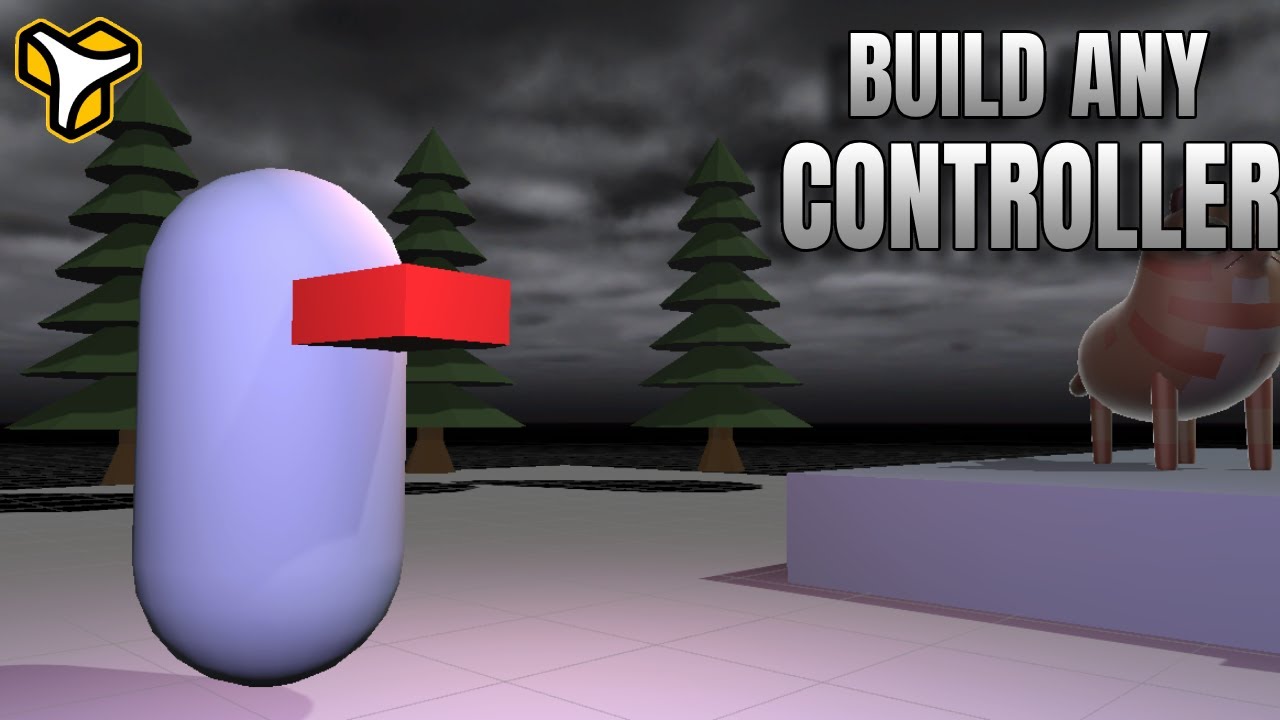
In this section, I demonstrate four player controller samples: first person, third person, top-down, and side scroller. All of them follow the same core principles. First, let’s take a look at the player game object structure.
~~ PLAYER GAME OBJECT ~~
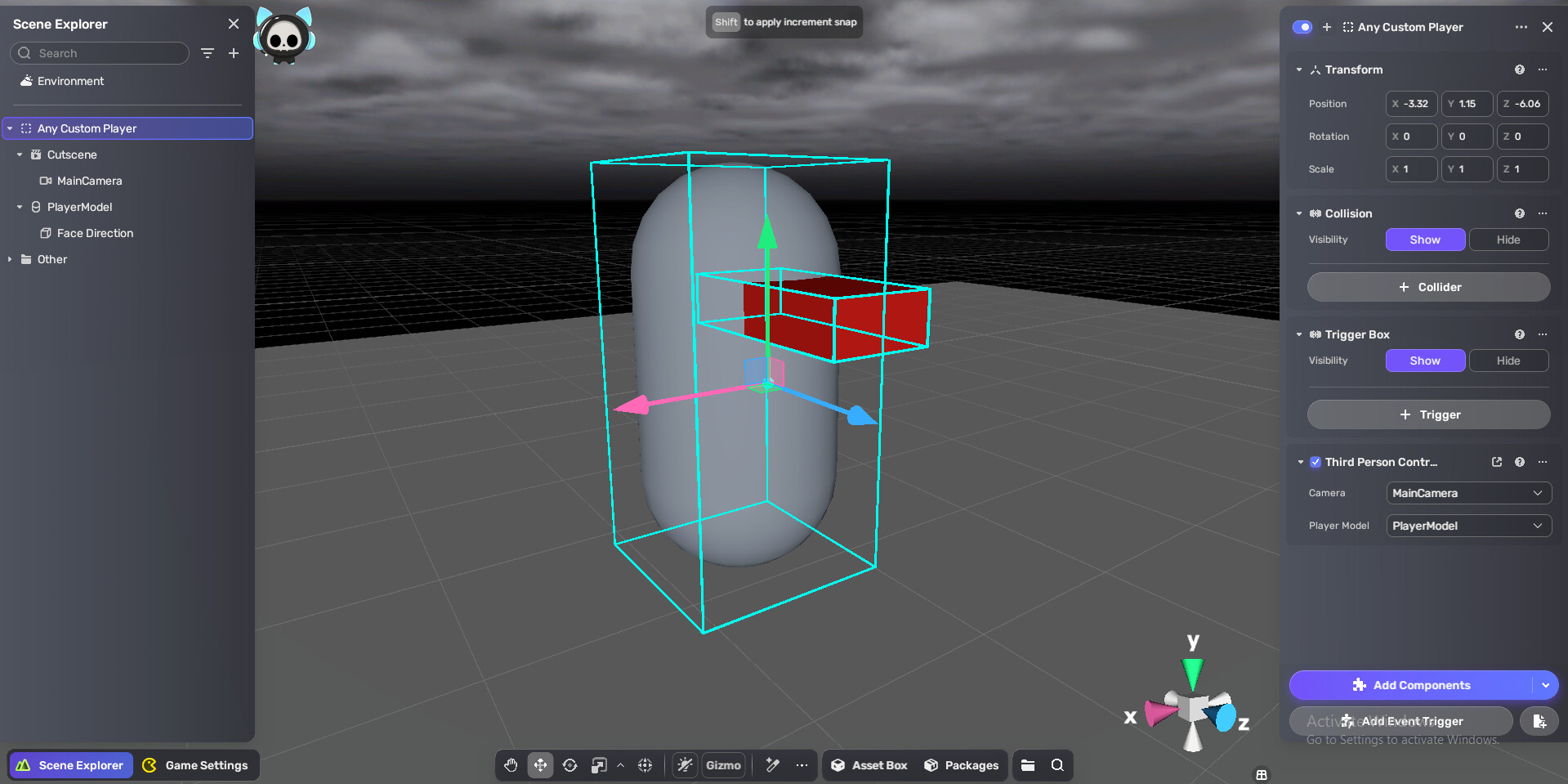
This is how every player is built. An empty object is used as the parent, and a cutscene is used as the camera, with the cutscene set to loop. The reason for using a cutscene is to easily adjust the camera position and rotation directly in the editor, and to quickly enable or disable the camera using cutscene events when needed.
 THIRD-PERSON CONTROLLER
local camera = script.fields.camera

local CharacterControllerComp = UnityEngine.CharacterController
local self = script.gameObject
local Input = UnityEngine.Input
local Mathf = UnityEngine.Mathf
local Vector3 = UnityEngine.Vector3
local Quaternion = UnityEngine.Quaternion
local Time = UnityEngine.Time
local Cursor = UnityEngine.Cursor
local CursorLockMode = UnityEngine.CursorLockMode

-- Config
local moveSpeed = 5.0
local mouseSensitivity = 3.0
local rotationSmoothSpeed = 10.0
local cameraSmoothSpeed = 10.0
local minPitch = -40.0
local maxPitch = 80.0
local cameraDistance = 5.0
local cameraHeight = 1.5
local gravity = -30.0

local controller
local transform = self.transform
local cameraTransform
local yaw = 0.0
local pitch = 10.0
local verticalVelocity = 0.0

script.OnStart(function()
    controller = self:GetComponent(typeof(CharacterControllerComp))
    if controller == nil then
        controller = self:AddComponent(typeof(CharacterControllerComp))
        controller.height = 1.8
    end
    cameraTransform = camera.transform
    local ce = cameraTransform.eulerAngles
    yaw = ce.y
    pitch = ce.x

    Cursor.lockState = CursorLockMode.Locked
    Cursor.visible = false
end)

script.OnUpdate(function()
    HandleCamera()
    HandleMovement()
end)

function HandleMovement()
    local h = Input.GetAxis("Horizontal") -- A/D input
    local v = Input.GetAxis("Vertical")   -- W/S input
    local inputVec = Vector3(h, 0, v)
    local moveDir = Vector3(0, 0, 0)

    if inputVec.magnitude > 0.01 then
        -- Move direction relative to camera
        local camYawRot = Quaternion.Euler(0, yaw, 0)
        moveDir = (camYawRot * inputVec).normalized

        -- Rotate player to face movement direction
        local targetYaw = Mathf.Atan2(moveDir.x, moveDir.z) * Mathf.Rad2Deg
        local currentYaw = transform.eulerAngles.y
        local smoothYaw = Mathf.LerpAngle(currentYaw, targetYaw, Time.deltaTime * rotationSmoothSpeed)
        transform.rotation = Quaternion.Euler(0, smoothYaw, 0)
    end

    -- Gravity
    if controller.isGrounded then
        verticalVelocity = -2
    else
        verticalVelocity = verticalVelocity + gravity * Time.deltaTime
    end

    local velocity = moveDir * moveSpeed + Vector3(0, verticalVelocity, 0)
    controller:Move(velocity * Time.deltaTime)
end

function HandleCamera()
    local mx = Input.GetAxis("Mouse X")
    local my = Input.GetAxis("Mouse Y")

    yaw = yaw + mx * mouseSensitivity
    pitch = Mathf.Clamp(pitch - my * mouseSensitivity, minPitch, maxPitch)

    local camRot = Quaternion.Euler(pitch, yaw, 0)
    local desiredPos = transform.position + Vector3(0, cameraHeight, 0) + (camRot * Vector3(0, 0, -cameraDistance))

    cameraTransform.position = Vector3.Lerp(cameraTransform.position, desiredPos, Time.deltaTime * cameraSmoothSpeed)
    cameraTransform:LookAt(transform.position + Vector3(0, cameraHeight, 0))
end

function AnimationFinished(earlyTime)
    local Controller = script.GetLuaComponentByGameObject(PlayerModel, "com.yahaha.sdk.animator.components.YaPlayableController")
    local state
    if Controller then
        state = Controller.Layers[1].CurrentState
    end
    if not state then
        return false
    end
    if state.Length and state.Length > 0 and earlyTime > 0 then
        local earlyThreshold = 1 - (earlyTime / state.Length)
        return state.NormalizedTime >= earlyThreshold
    end
    return state.NormalizedTime >= 1
end
local fieldDefs = {
    {
        name = "camera", type = "GameObject"
    },
}
script.DefineFields(fieldDefs)
FIRST-PERSON CONTROLLER
local camera = script.fields.camera
local CharacterControllerComp = UnityEngine.CharacterController
local self = script.gameObject
local Input = UnityEngine.Input
local Mathf = UnityEngine.Mathf
local Vector3 = UnityEngine.Vector3
local Quaternion = UnityEngine.Quaternion
local Time = UnityEngine.Time
local Cursor = UnityEngine.Cursor
local CursorLockMode = UnityEngine.CursorLockMode

local moveSpeed = 5.0
local mouseSensitivity = 3.0
local minPitch = -80.0
local maxPitch = 80.0
local gravity = -30.0

local controller
local transform = self.transform
local cameraTransform
local yaw = 0.0
local pitch = 0.0
local verticalVelocity = 0.0

script.OnStart(function()
    controller = self:GetComponent(typeof(CharacterControllerComp))
    if controller == nil then
        controller = self:AddComponent(typeof(CharacterControllerComp))
        controller.height = 1.8
    end

    cameraTransform = camera.transform
    local ce = cameraTransform.eulerAngles
    yaw = ce.y
    pitch = 0

    Cursor.lockState = CursorLockMode.Locked
    Cursor.visible = false
end)

script.OnUpdate(function()
    HandleMouseLook()
    HandleMovement()
end)

function HandleMouseLook()
    local mx = Input.GetAxis("Mouse X")
    local my = Input.GetAxis("Mouse Y")

    yaw = yaw + mx * mouseSensitivity
    pitch = Mathf.Clamp(pitch - my * mouseSensitivity, minPitch, maxPitch)
    transform.rotation = Quaternion.Euler(0, yaw, 0)
    cameraTransform.localRotation = Quaternion.Euler(pitch, 0, 0)
end

function HandleMovement()
    local h = Input.GetAxis("Horizontal")
    local v = Input.GetAxis("Vertical")

    local moveDir =
        transform.forward * v +
        transform.right * h

    if controller.isGrounded then
        verticalVelocity = -2
    else
        verticalVelocity = verticalVelocity + gravity * Time.deltaTime
    end

    local velocity = moveDir * moveSpeed + Vector3(0, verticalVelocity, 0)
    controller:Move(velocity * Time.deltaTime)
end
local fieldDefs = {
    {
        name = "camera", type = "GameObject"
    }
}
script.DefineFields(fieldDefs)
TOP-DOWN CONTROLLER
local CharacterControllerComp = UnityEngine.CharacterController
local PlayerModel = script.fields.PlayerModel
local self = script.gameObject
local Input = UnityEngine.Input
local Vector3 = UnityEngine.Vector3
local Quaternion = UnityEngine.Quaternion
local Time = UnityEngine.Time
local Mathf = UnityEngine.Mathf


local moveSpeed = 5.0
local gravity = -30.0

local controller
local verticalVelocity = 0.0
local State = {
    Idle = 1,
    Walk = 2
}
local currentState = State.Idle
local lastState = nil

script.OnStart(function()
    controller = self:GetComponent(typeof(CharacterControllerComp))
    if controller == nil then
        controller = self:AddComponent(typeof(CharacterControllerComp))
        controller.height = 1.8
    end
end)

script.OnUpdate(function()
    HandleMovement()
end)

function HandleMovement()
    local h = Input.GetAxis("Horizontal")
    local v = Input.GetAxis("Vertical")

    local moveDir = Vector3(h, 0, v)

    if moveDir.magnitude > 0.01 then
        moveDir = moveDir.normalized

        -- Rotate model to face movement direction
        local targetYaw = Mathf.Atan2(moveDir.x, moveDir.z) * Mathf.Rad2Deg
        local smoothYaw = Mathf.LerpAngle(PlayerModel.transform.eulerAngles.y, targetYaw, Time.deltaTime * 10)
        PlayerModel.transform.rotation = Quaternion.Euler(0, smoothYaw, 0)
    end

    if controller.isGrounded then
        verticalVelocity = -2
    else
        verticalVelocity = verticalVelocity + gravity * Time.deltaTime
    end

    local velocity = moveDir * moveSpeed + Vector3(0, verticalVelocity, 0)
    controller:Move(velocity * Time.deltaTime)
end
local fieldDefs = {
    {
        name = "camera", type = "GameObject"
    },
    {
        name = "PlayerModel", type = "GameObject"
    }
}
script.DefineFields(fieldDefs)
SIDE-SCROLLER CONTROLLER
local CharacterControllerComp = UnityEngine.CharacterController
local PlayerModel = script.fields.PlayerModel
local self = script.gameObject
local Input = UnityEngine.Input
local KeyCode = UnityEngine.KeyCode
local Vector3 = UnityEngine.Vector3
local Time = UnityEngine.Time

local moveSpeed = 6.0
local jumpForce = 10.0
local gravity = -30.0

local controller
local verticalVelocity = 0.0
local facingRight = true

script.OnStart(function()
    controller = self:GetComponent(typeof(CharacterControllerComp))
    if controller == nil then
        controller = self:AddComponent(typeof(CharacterControllerComp))
        controller.height = 1.8
    end
end)

script.OnUpdate(function()
    HandleMovement()
end)

function HandleMovement()
    local h = Input.GetAxis("Horizontal") -- horizontal movement
    local moveDir = Vector3(h, 0, 0)

    -- Flip player when changing direction
    if h > 0 and not facingRight then
        facingRight = true
        PlayerModel.transform.rotation = Quaternion.Euler(0, 0, 0)
    elseif h < 0 and facingRight then
        facingRight = false
        PlayerModel.transform.rotation = Quaternion.Euler(0, 180, 0)
    end

    -- Jump
    if controller.isGrounded then
        if verticalVelocity < 0 then
            verticalVelocity = -2
        end
        if Input.GetKeyDown(KeyCode.Space) then
            verticalVelocity = jumpForce
        end
    else
        verticalVelocity = verticalVelocity + gravity * Time.deltaTime
    end

    local velocity = moveDir * moveSpeed + Vector3(0, verticalVelocity, 0)
    controller:Move(velocity * Time.deltaTime)
end
local fieldDefs = {
    {
        name = "camera", type = "GameObject"
    },
    {
        name = "PlayerModel", type = "GameObject"
    }
}
script.DefineFields(fieldDefs)
In this section, I explain how to create a custom system for handling trigger enter and exit events. This can be used in many situations, but in this tutorial, I focus specifically on detecting when the player enters and exits a trigger area.
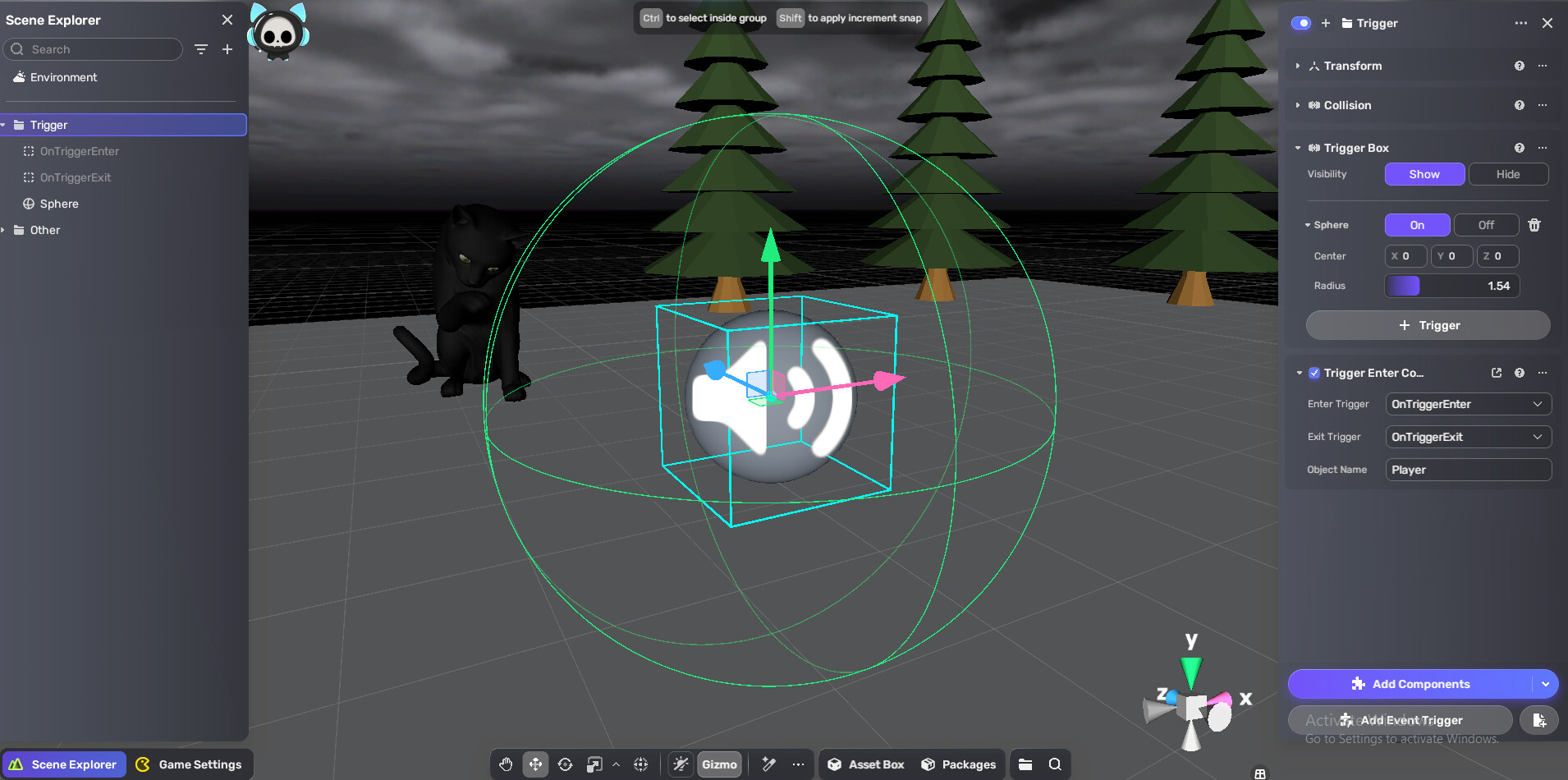
Start by creating a group with two empty objects. Each empty object contains an event that will be triggered when the player enters or exits the trigger area. Attach the script and trigger box to the parent group object, then set the keyword for the object name you want the trigger to detect.
TRIGGER HANDLER
local EnterTrigger = script.fields.EnterTrigger
local ExitTrigger = script.fields.ExitTrigger
local KeyWord = script.fields.KeyWord

local function OnTriggerEnter(collision)
    if collision.gameObject.name:find(KeyWord) then
        EnterTrigger:SetActive(true)
        ExitTrigger:SetActive(false)

    end
end

local function OnTriggerExit(collision)
    if collision.gameObject.name:find(KeyWord) then
        EnterTrigger:SetActive(false)
        ExitTrigger:SetActive(true)
    end
end

local cancelEnterFunc = YaPhysicsAPI.OnTriggerEnter(script.gameObject,OnTriggerEnter)
local cancelExitFunc = YaPhysicsAPI.OnTriggerExit(script.gameObject,OnTriggerExit)

script.OnDispose(function ()
    cancelEnterFunc()
    cancelExitFunc()
end)
local fieldDefs = {
    { name = "EnterTrigger", type = "GameObject"},
    { name = "ExitTrigger", type = "GameObject"},
    { name = "KeyWord", type = "string"}
}
script.DefineFields(fieldDefs)
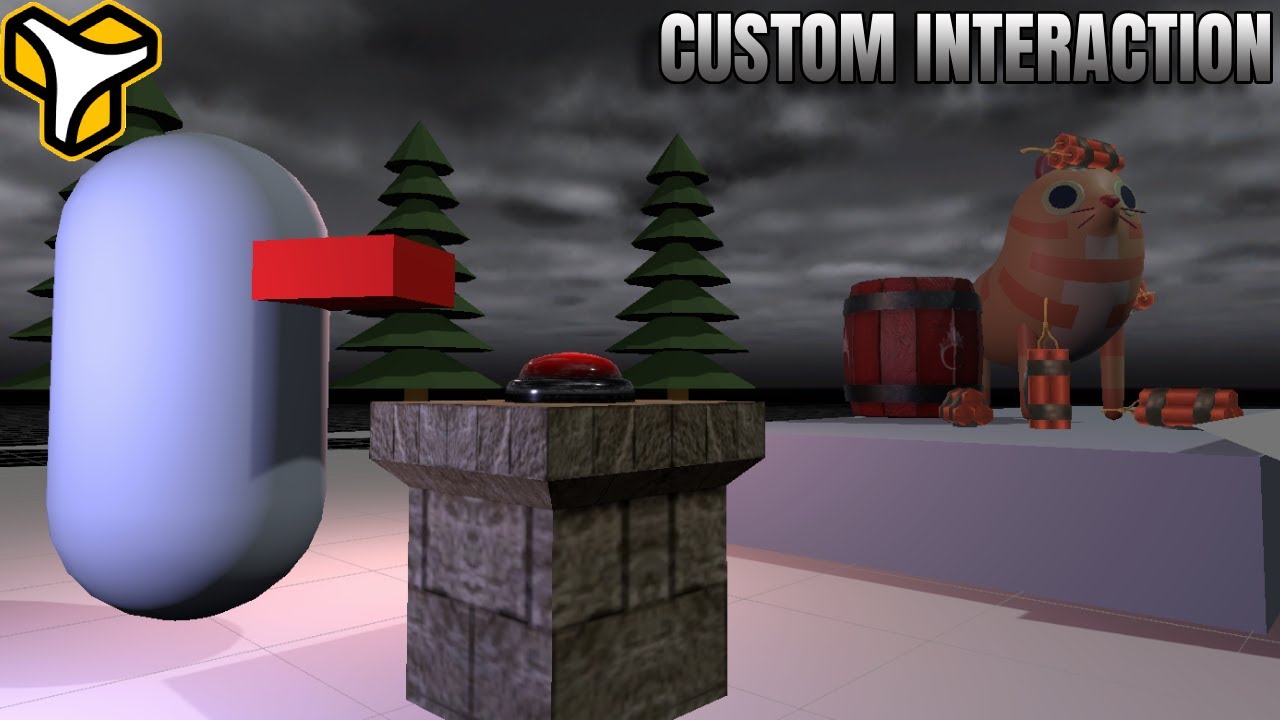
There are many ways to handle interaction, depending on how you design your game and characters. If you’re using a first-person or over-the-shoulder third-person controller, the built-in interactable component usually works well since the player can rotate camera to look around.
For other controller types, the built-in interaction system is often not suitable. In those cases, you can create custom interactions using raycasts or interaction areas. In this tutorial, I focus on interaction areas because they’re easier to implement and work well for most projects.
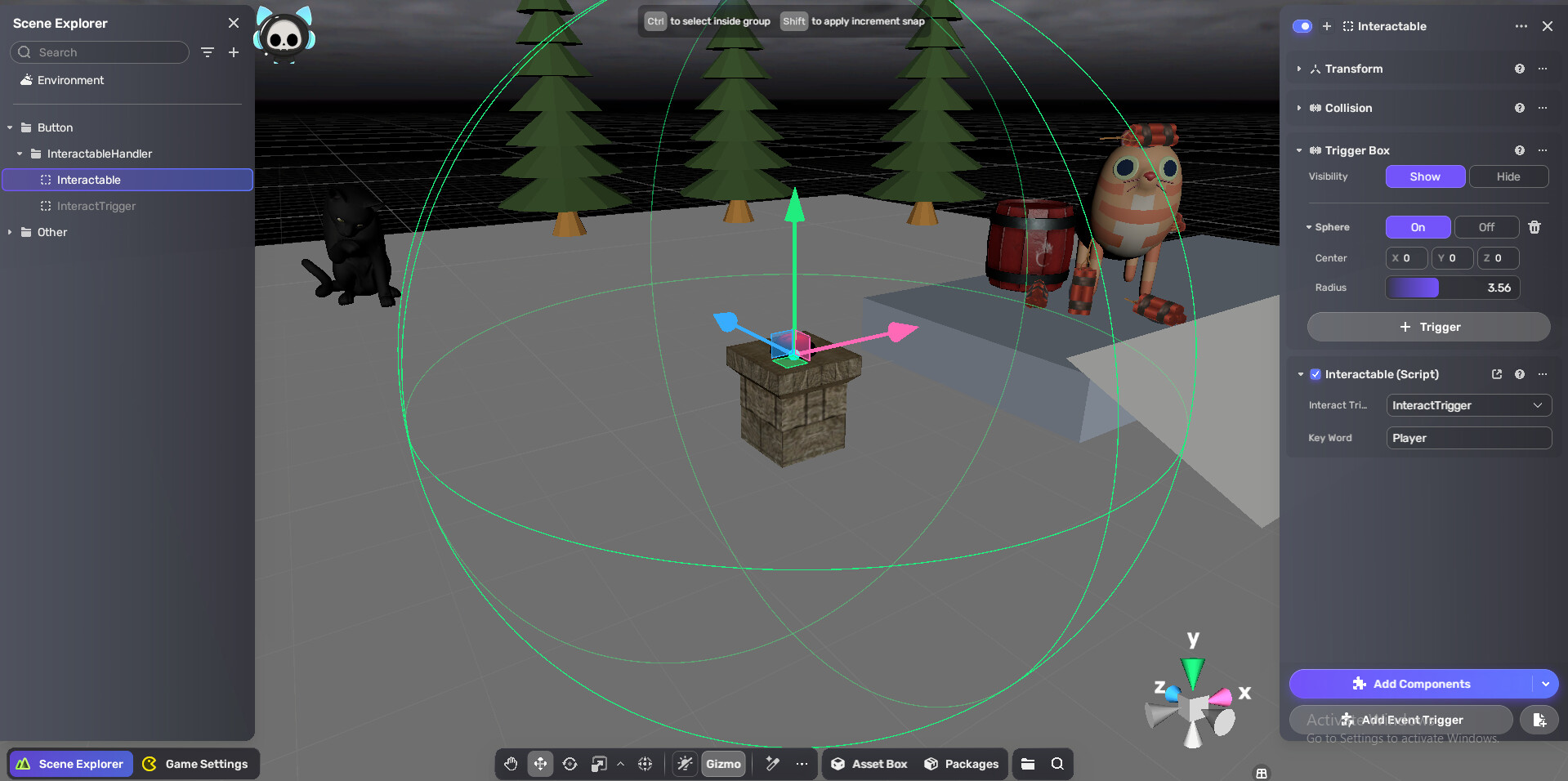
Just like the trigger handler, this interaction system uses a trigger box and an additional object that fires an event when the player presses the interact key while inside the trigger area.
INTERACTION HANDLER
local interactTrigger = script.fields.InteractTrigger
local KeyWord = script.fields.KeyWord
local canInteract = false

local Input = UnityEngine.Input
local KeyCode = UnityEngine.KeyCode
local self = script.gameObject

script.OnUpdate(function ()
    if canInteract and Input.GetKeyDown(KeyCode.E) then
        interactTrigger:SetActive(true)
        canInteract = false
        self:Destroy()
    end
end)

local function OnTriggerEnter(collision)
    if collision.gameObject.name:find(KeyWord) then
        canInteract = true
    end
end

local function OnTriggerExit(collision)
    if collision.gameObject.name:find(KeyWord) then
        canInteract = false
    end
end

local cancelEnterFunc = YaPhysicsAPI.OnTriggerEnter(script.gameObject,OnTriggerEnter)
local cancelExitFunc = YaPhysicsAPI.OnTriggerExit(script.gameObject,OnTriggerExit)

script.OnDispose(function ()
    cancelEnterFunc()
    cancelExitFunc()
end)
local fieldDefs = {
    { name = "InteractTrigger", type = "GameObject"},
    { name = "KeyWord", type = "string"}
}
script.DefineFields(fieldDefs)
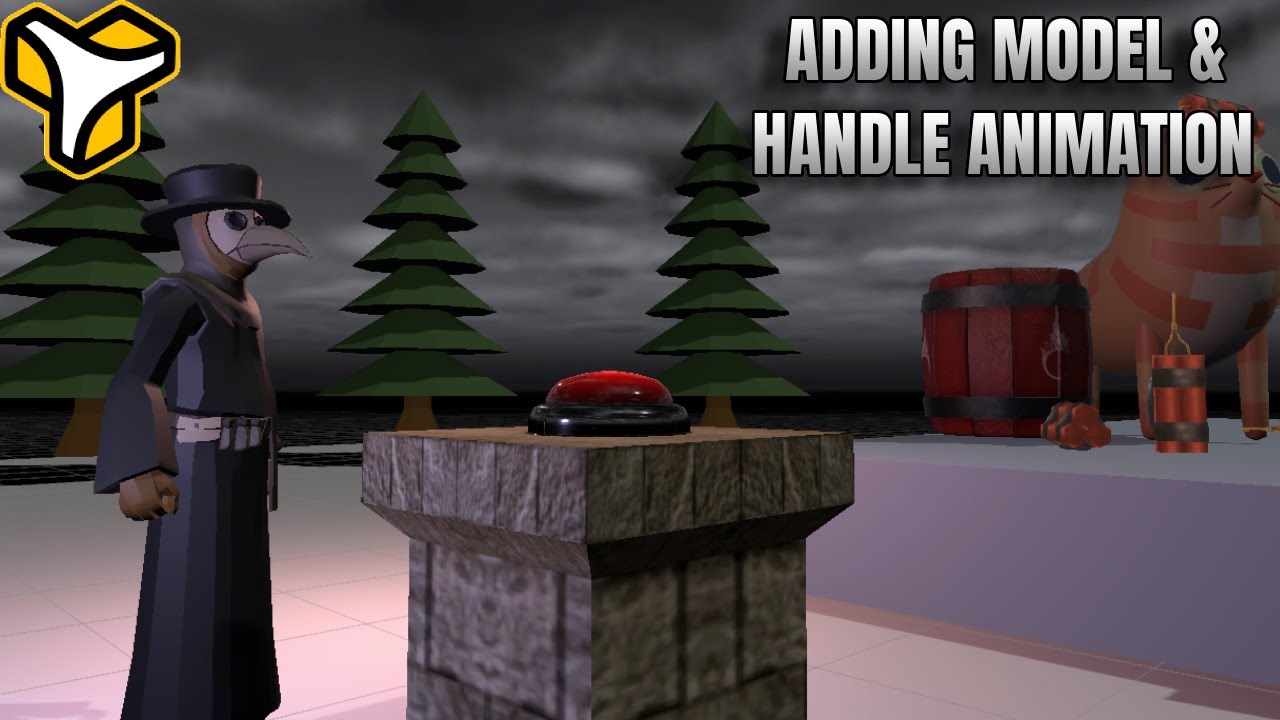
For this part, I use models and animations from the Yahaha asset library and Horror package, but you can use any model you want or import your own.
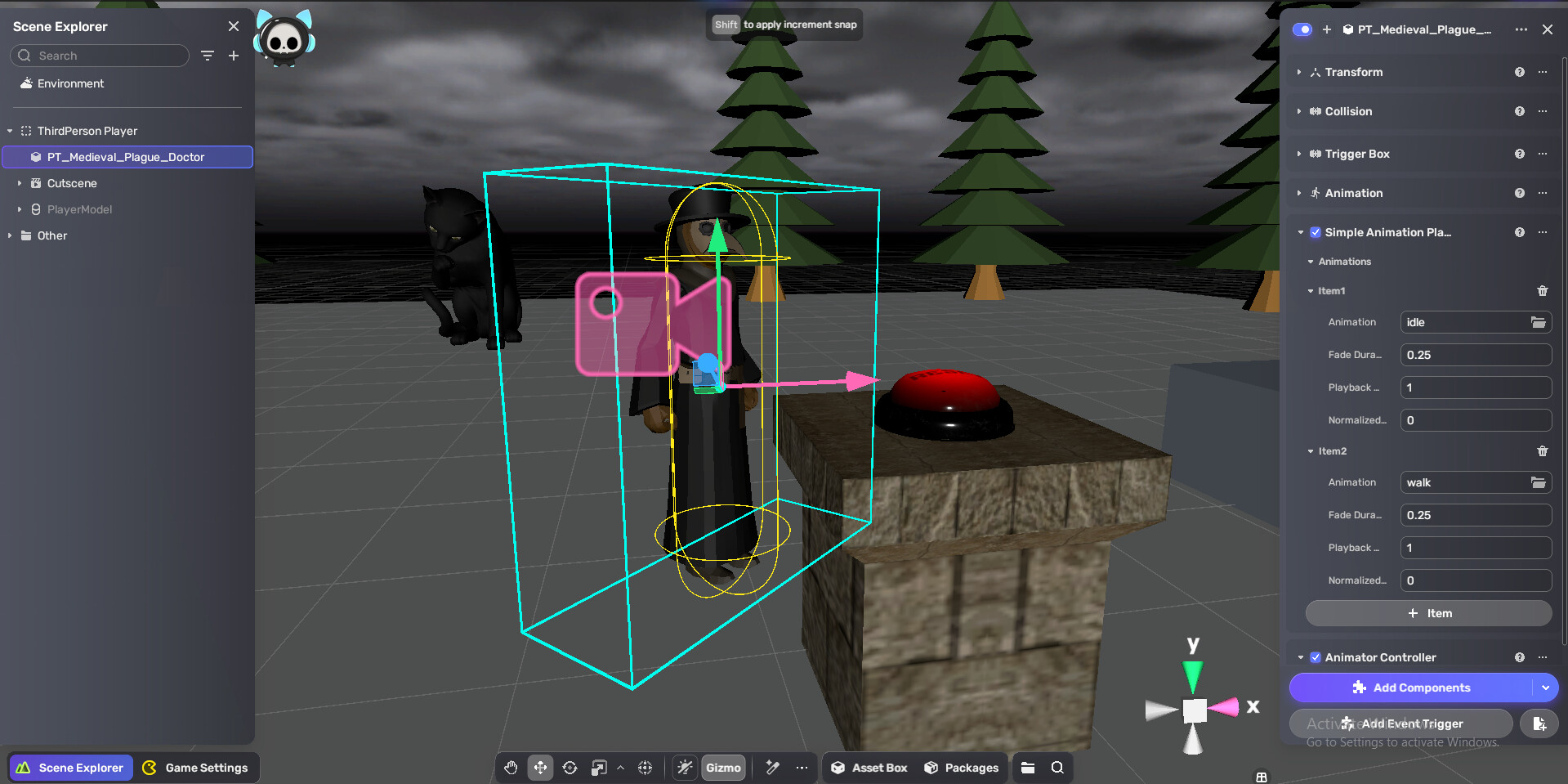
Add an Animation Player component and an Animator Controller component to the model. This time, we’ll only update the script — I’ll use the updated third person controller as the example.
THIRD-PERSON CONTROLLER WITH ANIMATION HANDLER
local camera = script.fields.camera
local playerModel = script.fields.PlayerModel
local AnimationPlayer -- from the player model

local CharacterControllerComp = UnityEngine.CharacterController
local self = script.gameObject
local Input = UnityEngine.Input
local Mathf = UnityEngine.Mathf
local Vector3 = UnityEngine.Vector3
local Quaternion = UnityEngine.Quaternion
local Time = UnityEngine.Time
local Cursor = UnityEngine.Cursor
local CursorLockMode = UnityEngine.CursorLockMode

-- Config
local moveSpeed = 5.0
local mouseSensitivity = 3.0
local rotationSmoothSpeed = 10.0
local cameraSmoothSpeed = 10.0
local minPitch = -40.0
local maxPitch = 80.0
local cameraDistance = 5.0
local cameraHeight = 1.5
local gravity = -30.0

local controller
local transform = self.transform
local cameraTransform
local yaw = 0.0
local pitch = 10.0
local verticalVelocity = 0.0

script.OnStart(function()
    controller = self:GetComponent(typeof(CharacterControllerComp))
    if controller == nil then
        controller = self:AddComponent(typeof(CharacterControllerComp))
        controller.height = 1.8
    end
    AnimationPlayer = script.GetLuaComponentByGameObject(playerModel, "com.yahaha.sdk.animator.components.SimpleAnimationPlayComponent")
    cameraTransform = camera.transform
    local ce = cameraTransform.eulerAngles
    yaw = ce.y
    pitch = ce.x

    Cursor.lockState = CursorLockMode.Locked
    Cursor.visible = false
end)

script.OnUpdate(function()
    HandleCamera()
    HandleMovement()
end)

function HandleMovement()
    local h = Input.GetAxis("Horizontal") -- A/D input
    local v = Input.GetAxis("Vertical")   -- W/S input
    local inputVec = Vector3(h, 0, v)
    local moveDir = Vector3(0, 0, 0)

    if inputVec.magnitude > 0.01 then
        -- Move direction relative to camera
        local camYawRot = Quaternion.Euler(0, yaw, 0)
        moveDir = (camYawRot * inputVec).normalized

        -- Rotate player to face movement direction
        local targetYaw = Mathf.Atan2(moveDir.x, moveDir.z) * Mathf.Rad2Deg
        local currentYaw = transform.eulerAngles.y
        local smoothYaw = Mathf.LerpAngle(currentYaw, targetYaw, Time.deltaTime * rotationSmoothSpeed)
        transform.rotation = Quaternion.Euler(0, smoothYaw, 0)
        currentState = State.Walk
    else
        currentState = State.Idle
    end

    -- Gravity
    if controller.isGrounded then
        verticalVelocity = -2
    else
        verticalVelocity = verticalVelocity + gravity * Time.deltaTime
    end

    local velocity = moveDir * moveSpeed + Vector3(0, verticalVelocity, 0)
    controller:Move(velocity * Time.deltaTime)
    if currentState ~= lastState then
        if currentState == State.Idle then
            print("Idle")
            AnimationPlayer.Play(State.Idle, 1)
        elseif currentState == State.Walk then
            print("Walk")
            AnimationPlayer.Play(State.Walk, 1)
        end
        lastState = currentState
    end
    if AnimationFinished(0.1) then
        AnimationPlayer.Play(currentState, 1)
    end
end

function HandleCamera()
    local mx = Input.GetAxis("Mouse X")
    local my = Input.GetAxis("Mouse Y")

    yaw = yaw + mx * mouseSensitivity
    pitch = Mathf.Clamp(pitch - my * mouseSensitivity, minPitch, maxPitch)

    local camRot = Quaternion.Euler(pitch, yaw, 0)
    local desiredPos = transform.position + Vector3(0, cameraHeight, 0) + (camRot * Vector3(0, 0, -cameraDistance))

    cameraTransform.position = Vector3.Lerp(cameraTransform.position, desiredPos, Time.deltaTime * cameraSmoothSpeed)
    cameraTransform:LookAt(transform.position + Vector3(0, cameraHeight, 0))
end

function AnimationFinished(earlyTime)
    local Controller = script.GetLuaComponentByGameObject(playerModel, "com.yahaha.sdk.animator.components.YaPlayableController")
    local state
    if Controller then
        state = Controller.Layers[1].CurrentState
    end
    if not state then
        return false
    end
    if state.Length and state.Length > 0 and earlyTime > 0 then
        local earlyThreshold = 1 - (earlyTime / state.Length)
        return state.NormalizedTime >= earlyThreshold
    end
    return state.NormalizedTime >= 1
end
local fieldDefs = {
    {
        name = "camera", type = "GameObject"
    },
    { name = "PlayerModel", type = "GameObject"}
}
script.DefineFields(fieldDefs)
---------------------------------------------------- THE END ----------------------------------------------------
That wraps up this guide on building custom player controllers, triggers, interactions, and animations in Yahaha HGK. I hope this workflow helps you create more flexible systems and experiment with new game ideas. Feel free to adapt and expand these setups to match your own projects, and let me know if you find new use cases or improvements. Thanks for reading, and happy developing! 